OpenFileDialog(開くダイアログ)
OpenFileDialogはファイルを開く時に表示されるダイアログ画面です。
関連項目:ファイル読込み
「ファイルを開く」ダイアログでファイルを選択する
- 例)ダイアログを表示して選択されたファイルパスを取得する
-
using System.Windows.Forms;

//オープンファイルダイアログを生成する
OpenFileDialog op = new OpenFileDialog();
op.Title = "ファイルを開く";
op.InitialDirectory = @"C:\";
op.FileName = @"hoge.txt";
op.Filter = "テキストファイル(*.txt;*.text)|*.txt;*.text|すべてのファイル(*.*)|*.*";
op.FilterIndex = 1;

//オープンファイルダイアログを表示する
DialogResult result = op.ShowDialog();

if (result == DialogResult.OK)
{
  //「開く」ボタンが選択された時の処理
  string fileName = op.FileName;  //こんな感じで選択されたファイルのパスが取得できる
}
else if (result == DialogResult.Cancel)
{
  //「キャンセル」ボタンまたは「×」ボタンが選択された時の処理
}
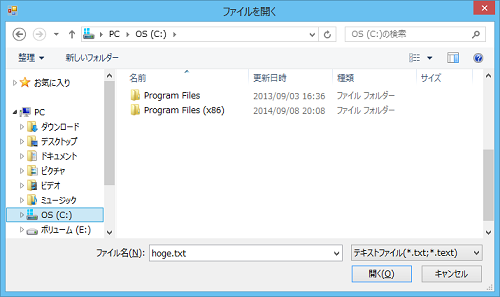
【上記ソースで生成されるダイアログ】
OpenFileDialogのプロパティ
OpenFileDialogのプロパティには以下のようなものがあります。
| プロパティ | 意味 | 例 |
|---|---|---|
| Title | ダイアログのタイトルを指定する (指定しないと「開く」) | op.Title = "ファイルを開く"; |
| InitialDirectory | 初期表示時のディレクトリを指定する | op.InitialDirectory = @"C:\"; |
| FileName | ファイル名を指定、取得する | op.FileName = @"hoge.txt"; |
| Filter | 選択できるファイルの種類を指定する | op.Filter = "テキストファイル(*.txt;*.text)|*.txt;*.text|すべてのファイル(*.*)|*.*"; |
| FilterIndex | Filterで指定した種類のデフォルト表示を指定する | op.FilterIndex = 1; |
| Multiselect | 複数ファイル選択の可否を指定する true:可能 false:不可(デフォルト) | op.Multiselect = true; |
| FileNames | 複数ファイル名を指定、取得する | string[] fn = op.FileNames; |
| ShowHelp | ヘルプ表示をするしないを指定する | op.ShowHelp = true; |
※例にある op はOpenFileDialogのインスタンスです。